
NotebookLM - a game changer for teachers?
one of the first really useful classroom AI tools

My inbox filled up last week with reports of Google’s NotebookLM, and how it might be the type of MOAT product that keeps Alphabet Inc in the AI lead for the next while. However, I expect the other competitors (Grok - Musk, Meta - Zuckerberg, Claude - Anthropic, and ChatGPT - Altman and whoever didn’t resign…) to announce similar interfaces in short order. And you can bet that Apple will announce their AI (an upgrade to Siri?) before the end of the year. Why? Because the AI business is likely worth TRILLIONS of dollars.
However, it looks like Google has arrived with the first killer app. Let me explain, and then give you a few examples of how you might use this in class. NotebookLM is Google’s free AI workspace and it is different from the regular LLMs in a very important way. While LLMs rely on their training to give you the best answer to your question, the answer is scoured from the internet, and it may not be everything you hoped for, as a teacher. In fact, as you follow up on your original query, the results will likely suffer from “drift” - straying farther away from your original information as you continue. NotebookLM on the other hand, uses your own uploaded resources as the source material for its answers to your questions. Think of it like a custom AI that has an excellent understanding of your course or unit, and it answers questions based on that (more limited, perhaps more appropriate) source of information. A caveat: as with everything else that’s free, if you’re not paying for the product, you ARE the product.
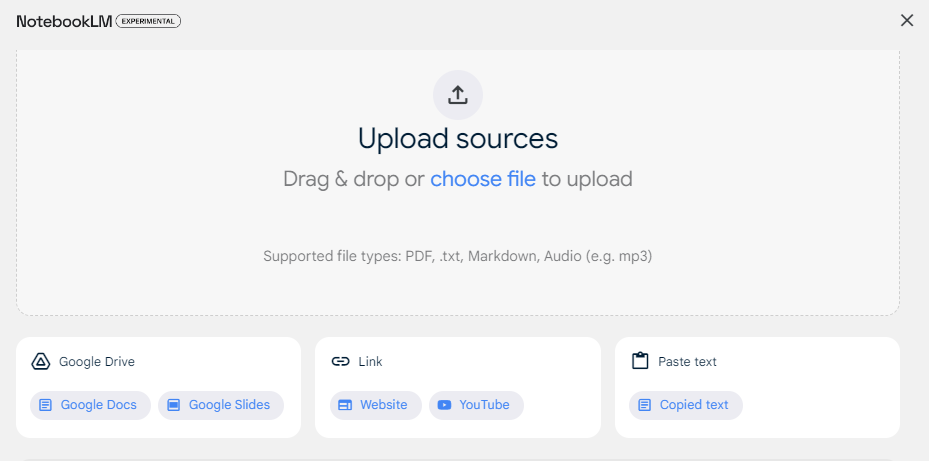
Imagine that you are starting a unit in one of your classes. You might upload your unit outline, PDFs of handouts, recommended YouTube videos, Google docs or slides, and other documents. Then you can create assignments, study guide, quizzes and tests, rubrics, overviews, and podcasts based on the material you uploaded. What I think teachers will really like is that they have more control over the material used as the source for answers. If I imagine asking ChatGPT to create a review activity based on <topic> in <course>, it will likely include content that is either peripheral to my unit, or content that, because of choices teachers make, not covered this time through. And I want the review, assignment, and assessment to closely adhere to what we covered in class.
However, the feature that has everyone talking is the ability to turn any text into a podcast - two hosts discussing the topic in a informative and engaging banter. Here is an example from my previous post on Orange Shirt Day (all I did was point to the post URL and ask NotebookLM to generate the audio). As Ethan Mollick noted in his last post, NotebookLM seems to add relevant information to the discussion, even when it wasn’t explicitly mentioned in the blog post. I’ve heard at least one writer mention that the podcast feature uses Gemini to work its magic on the text input.
How to start with NotebookLM? Go to notebooklm.google.com and see if it is enabled for your domain. If not, ask your administrator to enable it for teachers (I suggest waiting to enable on student accounts until teachers have had some time to experiment). Start a new notebook, or browse one of the samples included. I think you will have the best experience if you create a new notebook for each major unit in your course. (As always, I suggest taking a slow and steady approach, rather than a “move everything into NotebookLM right now” approach.) A notebook can have up to 50 sources, which is probably enough for your handouts, slide shows, and online resources for a unit, but likely not enough for your course. See the image below for the easy interaction with Google products.
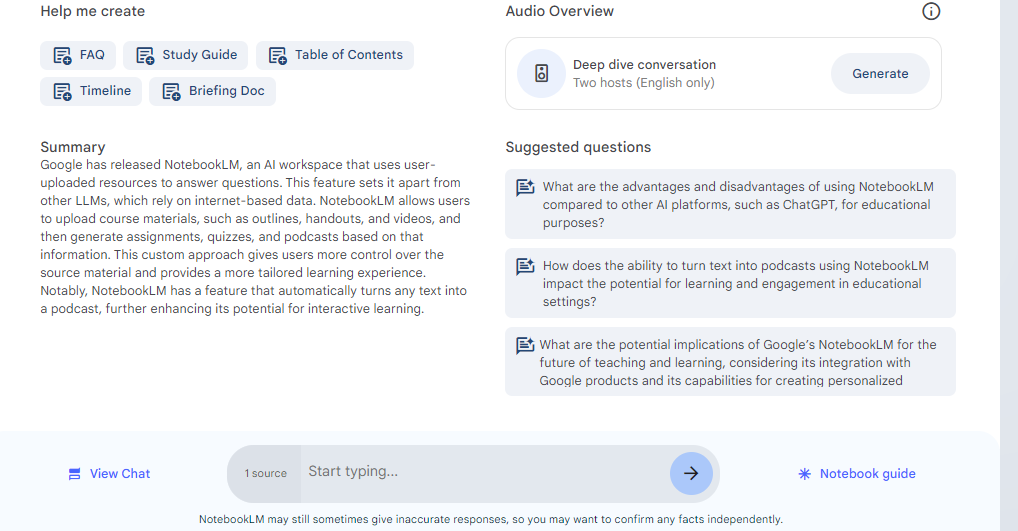
Once you have at least one source of information, you can choose from a number of predefined options, like creating a FAQ, a study guide, a table of contents, a timeline, or a briefing doc. You can also create a podcast based on the source(s) that you have selected. One handy feature is that you can pick and choose which sources to include, based on how far in the unit you are (ie: if you weren’t able to complete one activity in the unit this year, just deselect it from the included sources). The other really great thing is that you can ask questions (prompts for Gemini) just like you would with any LLM. So you can ask it to make a rubric, to give you ten multiple choice questions, to think of a creative way to teach <topic>, to create a review activity.
As I experiment with notebookLM, I will let you know of use cases for teachers and schools. But for now, here are some that come to mind:
use for staff meetings to generate summaries or action items from the minutes, to set the agenda for future meetings, and to track progress on specific items.
use to plan and follow up on your yearly school theme - the big picture goal for the year. Can use this to set goals and timelines.
for course planning, you can enter the curriculum guideline, your previous year outline, teaching resources, major assignments, and final project/exam, and then revise your course based on questions that you ask about time spent on topics, compared to the curriculum guideline, compared to importance on the final assessment.
use your unit notebook to produce notes or audio files for students who were away from class, rather than having to start the next class by catching them up.
creating review questions based on the material that you actually covered in class - short or long answer, multiple choice, etc.
create differentiated assignments for students with IEPs or for those who work above grade level.
I’m including two NotebookLM guides that you may find useful - the first from Amberle McKee (who mentions the idea of LLM “drift” that I referred to earlier, and the second from Rolf Mistelbacher. Two final instructions for you: when you ask a follow-up question or use one of the suggested questions, please “save to note” so that you have the reply listed the next time you open that notebook. If you don’t save, it will be gone next time you open the notebook. And second, it appears that MANY YouTube videos have a text transcript that NotebookLM will attach along with the video.
I for one, am hoping that the rapid release of AI tools and updates slows down enough for us to catch our breath. I’m not banking on it, but it would be nice to just take 2-3 months and learn more about what is already available for teachers. Wishful thinking…
That’s all for now,
Cheers,
-Rick